Solitaire Google: 7 Tips to Play, Win & Master the Classic Card Game in 2026 (Free Online)
You open Solitaire Google for a quick five-minute break. Then you look up and an hour has gone by. Sound familiar? That’s exactly what makes this game so dangerous — it looks like a simple card game, but there’s real strategy hiding underneath. And once you figure out that strategy, you stop losing on deals that should have been winnable.
This guide has everything you need. History, rules, controls for PC and mobile, tips for beginners, strategies for advanced players, and answers to the questions people search for the most in 2026. Read it once and you’ll play completely differently.
Let’s get into it. 🃏
What is Solitaire Google?
Solitaire Google is Google’s free online version of the classic Klondike card game. No download, no account, no payment — just open the page and you’re playing in seconds. It works on any device, looks great on any screen size, and has been one of the most searched free games online for years.
What Google did well here is keep it simple without dumbing it down. Clean interface, two difficulty modes, a scoring system that actually means something, and controls that feel natural whether you’re on a laptop or a phone. Whether you’re playing Solitaire Google on Chrome, Safari, or any other browser, the experience is identical — smooth, fast, and completely free.
A Brief History of Solitaire
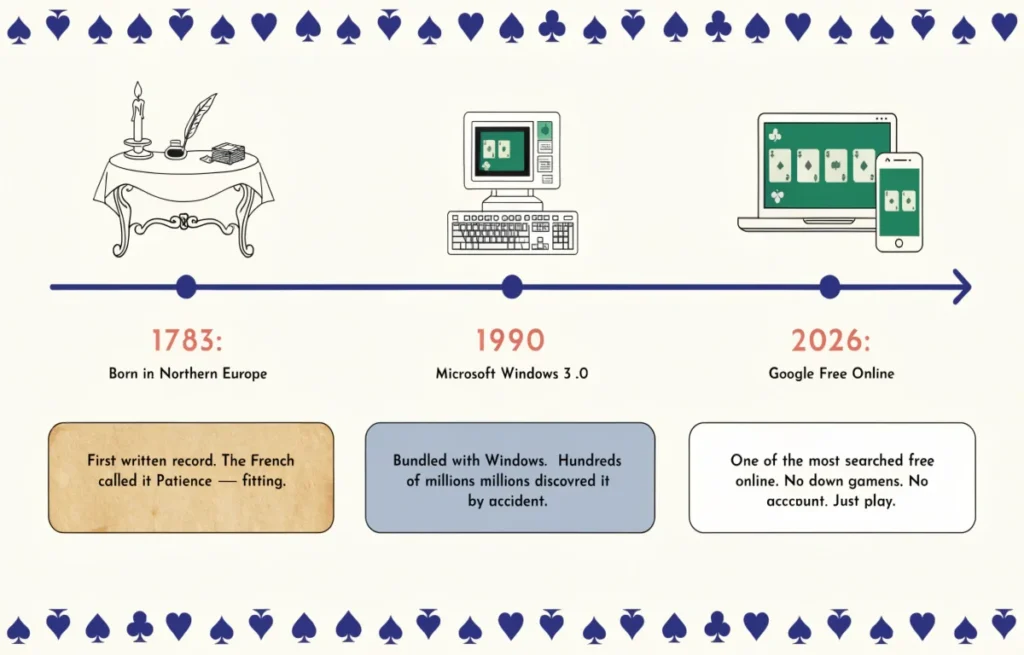
Solitaire is older than most people realize. The game first showed up in Northern Europe in the late 1700s, with the earliest written record dating to 1783. It spread across Europe fast — the French loved it so much they named their version “Patience,” which honestly describes the whole experience.
For most of its history, Solitaire was a physical card game played alone at a table. Then in 1990, Microsoft bundled it with Windows 3.0 — and suddenly it was on every computer in the world. Nobody went looking for it. It was just there, sitting on the desktop, and hundreds of millions of people found themselves clicking cards around that green felt background during meetings, lunch breaks, and slow afternoons.
The version Google uses — Klondike Solitaire — is the same one Microsoft made famous. Seven columns, a stock pile on the left, four foundation piles in the corner. If you’ve played Solitaire before anywhere, you already know the basic setup. Google later brought this same classic experience into their Doodle Games collection — which is why many people find it by searching for the Solitaire Google Doodle version specifically.
Why Google Made Its Own Solitaire
Google has always liked embedding little surprises into its products — the Chrome dinosaur game when you lose internet, Pac-Man hidden in Maps, mini-games tucked into search results. Solitaire fits that same idea perfectly.
It’s a game everyone already knows, it loads instantly in any browser, and it gives people a genuine reason to stay on Google instead of going somewhere else. In 2026, it’s still one of the most searched games online — because when someone wants to play Solitaire right now, Google’s version is usually the first result they click.
Solitaire Google Features — What Makes It Special
A lot of browser Solitaire games exist. Most of them are fine but forgettable. Google’s version stands out for a handful of specific reasons — and once you know what these features actually do, you’ll use them properly instead of ignoring them.
Game Objective
Simple version: move all 52 cards into the four foundation piles in the top right corner. Each pile is one suit, built from Ace up to King.
Harder version: doing that without getting stuck requires you to think several moves ahead, manage your stock pile carefully, and resist the urge to just move cards around randomly. The objective is easy to understand. Executing it consistently is the actual challenge.
Playing Field Explained
Three areas make up the entire game, and each one has a specific role.
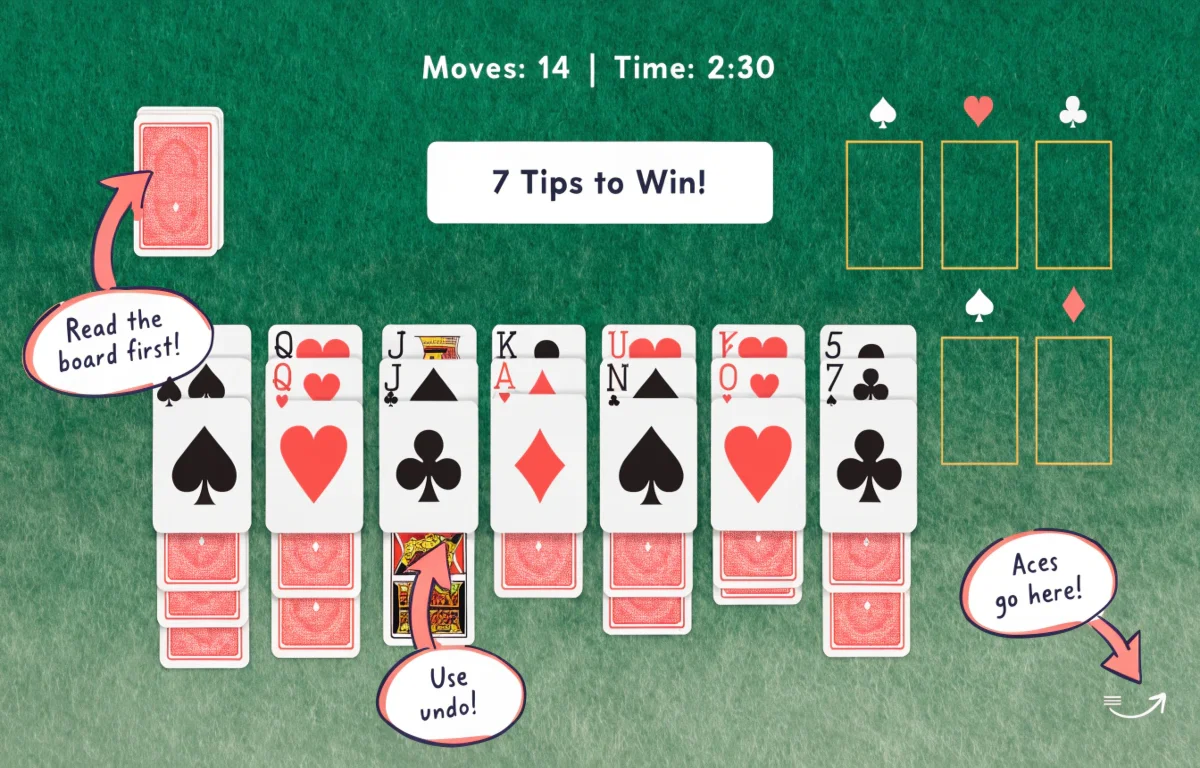
The Tableau is the main playing area — seven columns of cards that you’ll spend most of your time working with. Each column starts face-down except the top card. As you move cards off the top, the ones underneath flip face-up and become available. This is where most of the decision-making happens.
The Stock Pile sits in the top left corner. It holds the 24 cards that didn’t get dealt to the tableau at the start. You flip through these to find cards you need — one at a time in Easy mode, three at a time in Hard mode.
The Foundation Piles are the four empty slots in the top right. This is your goal. Build each one from Ace to King by suit, and when all four are complete, you win.
Difficulty Modes
Solitaire Google asks you to choose a difficulty before every game, and it actually matters.
Easy Mode flips one card at a time from the stock pile. You have full control over what you see and when. This is the better choice when you’re learning, when you want a relaxing game, or when a deal looks particularly tricky.
Hard Mode flips three cards at a time and only lets you use the top one. The cards you need might be buried under two others and completely inaccessible until you cycle through more of the pile. It’s the same game but it genuinely feels harder — because it is.
Scoring System
The score display at the top tracks your time, your points, and your total number of moves. Points go up when you move cards to the foundation and go down when you cycle through the stock pile too many times. The move counter is brutally honest — every unnecessary move shows up there.
If you play competitively against yourself or take turns with a friend, this scoring system gives the game a real edge that single-player Solitaire usually lacks.
Undo Feature
The Undo button at the bottom reverses your last move. Use it. There’s no penalty in standard play, and there’s absolutely no reason to sit there staring at a mistake when one click fixes it. Good players use undo constantly — not because they’re bad at the game, but because thinking through moves and trying things out is how you learn what works.
How to Play Solitaire Google — Complete Step by Step Guide
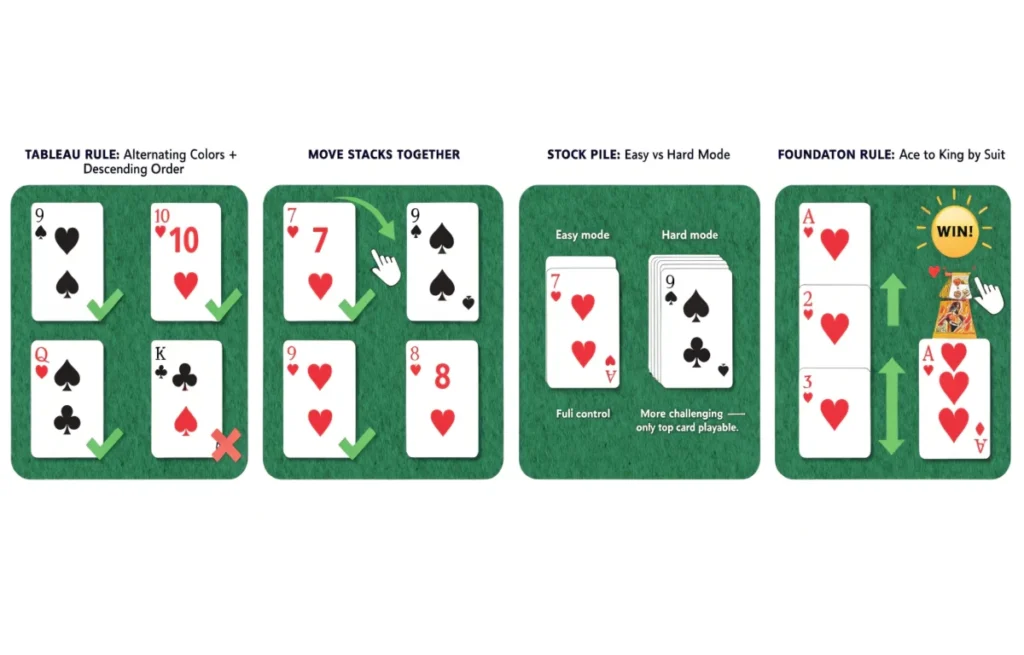
This is where most people get tripped up. The rules sound simple but they have specific mechanics that new players often misunderstand. Work through each step here and you’ll know exactly what you’re doing from the moment you start a game.
Step 1 — Look at the Board Before Touching Anything
This one sounds obvious and almost nobody does it. When a new game loads, give yourself five seconds to actually look at what’s in front of you. Which Aces are already visible? Are there any immediate sequences you can build? Is there a column with a lot of face-down cards that you should prioritize?
Players who jump straight into clicking random cards always run into trouble later. Players who take a few seconds to read the board before moving anything make far better decisions from the start.
Step 2 — Moving Cards on the Tableau
Cards on the tableau move in descending order with alternating colors. A black 9 goes on a red 10. A red Queen goes on a black King. You cannot put a red 7 on a red 8 or a black 5 on a black 6 — the color has to alternate every time.
You can also move stacks of already-sequenced cards together. If you’ve got a red 7 sitting on a black 8, you can pick up both of them at once and drop them onto a red 9. This is how you move big chunks of the tableau around efficiently.
On PC, click and drag. On mobile, tap a card to select it then tap where you want it to go. Double-clicking or double-tapping a card that’s ready for the foundation sends it there automatically — which saves a lot of dragging.
Step 3 — Using the Stock Pile
When the tableau runs out of obvious moves, click the stock pile to flip new cards. The idea isn’t to just keep clicking and hope something useful shows up — it’s to flip cards purposefully when you know what you need.
Every time you cycle through the entire stock pile, it counts as extra moves. Do it too many times and your score takes a hit. The stock pile is a resource, not a slot machine. Use it when you have a reason to.
Step 4 — Building the Foundation Piles
Every Ace you find goes straight to a foundation pile — no exceptions. Once an Ace is there, start building up: 2 of the same suit, then 3, then 4, all the way to King.
Here’s the part that trips up a lot of players: just because you can move a card to the foundation doesn’t always mean you should do it right now. Sometimes a low card sitting on the tableau is helping you build a sequence. Moving it to the foundation prematurely can strand other cards with nowhere to go. Think one or two moves ahead before sending anything up.
Step 5 — Winning the Game
All 52 cards in the four foundation piles, sorted by suit from Ace to King. When the last card lands, you get a win animation and your final stats. That’s it.
Getting there consistently requires everything covered in the rest of this guide — but now you understand the mechanics. The rest is strategy.
Controls — PC and Mobile
The controls are intuitive once you know them, but they’re slightly different depending on your device. Worth knowing before you start fumbling around trying to figure out why a card isn’t moving.
PC Controls
Everything is mouse-driven. Click and hold to pick up a card, drag to the destination, release to drop. If a card is ready for the foundation pile, double-click it and it jumps there automatically — no dragging needed.
Clicking the stock pile flips new cards. There are no keyboard shortcuts in Google’s version, so all your interaction happens through mouse clicks and drags.
Mobile Controls
On phones and tablets, tap a card to select it — you’ll see it highlight. Then tap the destination to move it. You can also drag with your finger if that feels more natural. Double-tap any card that belongs on a foundation pile and it moves there automatically, same as desktop.
The game works in both portrait and landscape. Landscape gives you a wider view of the full tableau, which most people find easier to manage — especially on smaller phones.
How to Win at Solitaire Google — Beginner to Advanced Tips
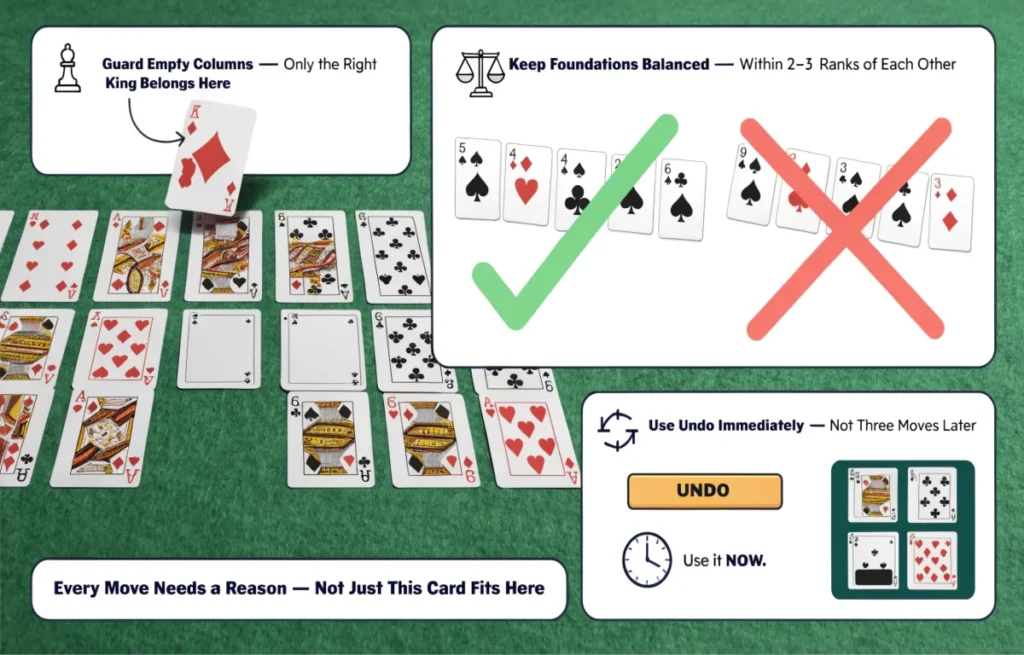
Not every Solitaire deal is winnable. Some layouts are just bad luck. But a significant percentage of losses happen on deals that could have been won with better decisions. These tips are organized by level so you can start where you are and build from there.
Beginner Tips — Stop Losing the Easy Ones
If you’re newer to Solitaire Google, these are the mistakes costing you winnable games.
Move Aces and 2s to the foundation the second you see them. These cards do nothing useful sitting on the tableau. Get them up immediately.
Focus on uncovering hidden cards. Every face-down card in the tableau is potential value you can’t access yet. Prioritize moves that flip new cards face-up over moves that just rearrange cards you can already see.
Be careful with empty columns. When you clear an entire column, only a King can go there. Don’t fill it with the first King you find — think about which King has the most useful cards attached to it and use that one.
Start on Easy mode. One card at a time from the stock pile gives you room to breathe and learn without the added pressure of Hard mode’s three-card draws.
Intermediate Tips — Win More Consistently
You understand the basics. Now here’s how to turn occasional wins into regular ones.
Work on the columns with the most face-down cards first. More hidden cards means more potential surprises — good and bad. Uncover them as early as possible so you can plan around what’s actually in the deck.
Every move should enable another move. Before you pick up a card, ask what happens after you place it. A move that unlocks two or three follow-up moves is infinitely more valuable than a move that just places one card and leaves you stuck again.
Don’t cycle the stock pile without making tableau moves in between. Flip, look for something useful, make tableau moves if possible, then flip again. Burning through the stock pile repeatedly without moving anything is a sign you’ve run out of ideas — and that usually means it’s time to undo back a few moves and try a different approach.
Guard your empty columns. Treat empty tableau spots like they’re precious, because they are. Dropping a random King in there just because you have one is usually a mistake. Wait until you know that King will actually open up something useful.
Advanced Winning Strategies
These are the habits that turn good players into players who rarely lose a winnable deal.
Every single move needs a reason. Not “this card fits here” — but “this move uncovers a card I need” or “this creates a sequence that gets me to the foundation.” Moving cards around without a specific goal just burns moves and leaves you in positions that are harder to escape.
Keep the foundation piles balanced. If one suit is racing ahead to 8 or 9 while others are still on 3 or 4, you’ll hit a wall. Cards from the faster suit start blocking tableau moves because there’s nowhere useful to put them. Try to keep all four piles within two or three ranks of each other.
Use undo early, not late. The moment a move feels wrong, undo it. Waiting three moves and then trying to undo back through them is painful. The undo button is most useful when you use it immediately after making a mistake, not after you’ve compounded it.
In Hard mode, remember what you’ve seen. When three cards flip, you can only play the top one — but you’ve seen all three. Store that information. When the top card gets played and the next one becomes available, you’re already prepared for it instead of surprised by it.
Common Mistakes to Avoid
These trips up even experienced players from time to time.
- Sending cards to the foundation too early and leaving the tableau stuck
- Only paying attention to face-up cards and ignoring the face-down ones underneath
- Dropping the wrong King into an empty column without thinking
- Cycling through the stock pile over and over without making any tableau moves between cycles
- Playing too fast — Solitaire rewards patience, not speed
Solitaire Google vs Classic Solitaire — What’s Different?
If you grew up playing Solitaire on Windows or with a physical deck, Google’s version will feel immediately familiar. The core rules are identical — alternating colors, descending order on the tableau, Ace-to-King on the foundations. That part hasn’t changed.
What’s different is everything around the rules. Google’s version has a clean, modern interface with no ads popping up in the middle of a game. The cards are big and readable on any screen size. The built-in scoring system tracks your time and moves in a way a physical deck obviously can’t. And the Undo button — a luxury you’ll never get with real cards — makes the digital version significantly more forgiving for new players.
The most interesting difference is actually the difficulty modes. Traditional Klondike Solitaire with a physical deck draws three cards at a time — which is Google’s Hard mode. So if you learned the game with real cards, Hard mode will feel like home. Easy mode’s one-card draw is actually a more accessible modern variant that makes the game considerably more winnable.
Why People Are Still Playing Solitaire Google in 2026
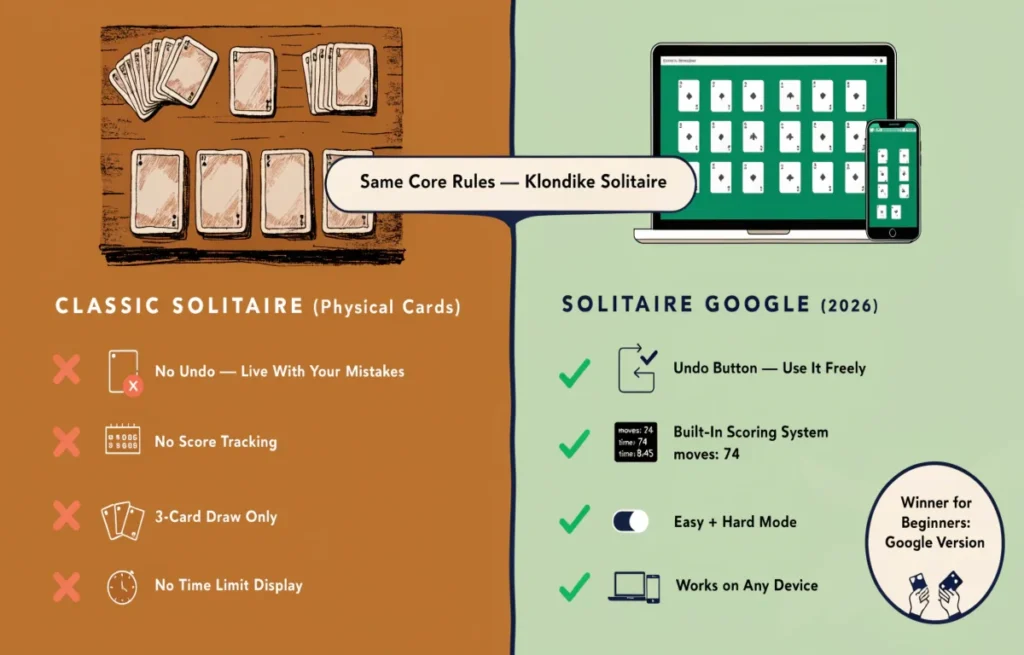
The game is over 200 years old. Microsoft popularized it in 1990. And in 2026, people are still searching for it and playing it every single day. That’s a remarkable run for any game — and it’s not an accident.
The sessions are the perfect length. A game takes somewhere between 5 and 20 minutes. Long enough to feel like you actually did something, short enough to fit into any gap in your day. You don’t need to commit to anything — you can quit mid-game with zero consequences.
It’s genuinely calming in a way that’s hard to find online in 2026. Most apps want your attention constantly — notifications, streaks, social features, something always pulling at you. Solitaire just wants you to move some cards. That quiet focus is surprisingly restful, and people keep coming back for it specifically because of that.
Every deal is different. Some games practically solve themselves. Others have you cycling the stock pile for the fifth time wondering what you missed. That variability means there’s always a reason to play one more round — and “one more round” is usually how an hour disappears.
And it’s still completely free and instant. No app to download, no account to create, no subscription to manage. Open the page, choose your difficulty, play. In 2026, that kind of zero-friction experience is genuinely rare.
Frequently Asked Questions
Here are the questions people search for most when it comes to Solitaire Google — answered directly.
Is Solitaire Google free to play?
Yes, completely free. No download, no account, no payment. Open the page and start immediately.
Can I play on my phone?
Yes. Works on Android and iOS through any modern browser. The touchscreen controls feel natural and responsive.
Is there a Spider Solitaire on Google?
Google’s standard version is Klondike Solitaire. Spider Solitaire is a different game that isn’t built into Google’s offering, but you can find it on other free gaming sites.
Can I play in full screen?
Yes. Press F11 in most desktop browsers to go full screen. On mobile the game already fills your screen automatically.
Is Solitaire Google unblocked at school or work?
Often yes — since it runs in a regular browser without any special software, it gets through many network filters that block dedicated gaming sites. Results vary by network.
What’s the difference between Easy and Hard mode?
Easy mode shows one card at a time from the stock pile. Hard mode shows three but only lets you play the top one. Hard mode is significantly more challenging and is worth trying once you’ve won a few games on Easy.
How does scoring work?
Points increase when you move cards to the foundation. They decrease when you cycle through the stock pile too many times. Fewer total moves and faster completion time both improve your final score.
Does it work offline?
No, an internet connection is needed to load the game. Once it’s loaded, brief interruptions usually don’t affect active gameplay.
Do I need a Google account?
No. Just open the page and play — no account, no sign-in, nothing required.
Is it the same as Windows Solitaire?
Same rules, different look. Both are Klondike Solitaire. Google’s version adds a move counter, difficulty modes, and a cleaner modern interface. The gameplay itself is identical.
Final Word
Solitaire Google has been around in various forms for over two centuries — and it’s still being played millions of times a day in 2026. That’s not nostalgia. That’s a genuinely good game that fits perfectly into how people actually live.
Now you know the history, the rules, the layout, the controls, and the strategies that separate lucky wins from consistent ones. The only thing left is to actually play.
Deal the cards. Choose your difficulty. See how fast you can win. 🃏